
Coinsnap for Gambio payment plugin
Gambio is a German shop system that offers a complete solution for online retailers with extensive functions and tools. It offers simple handling for small and medium-sized companies that want to design their own e-commerce presence.
Gambio was founded in 2005 and is used by more than 25,000 e-commerce merchants, primarily in Germany, Austria and Switzerland.
Gambio offers two different systems: Gambio Cloud and the self-hosted version.
The Gambio plugin from Coinsnap is provided free of charge for the self-hosted version. The Gambio Cloud version is not yet supported.

With the self-hosted store software Gambio, store operators opt for a flexible and user-friendly application. Neither programming skills nor in-depth knowledge of search engine optimisation are required. Gambio also offers users a customised layout for their shop and an easy-to-use user interface.
Coinsnap has developed a free module so that Bitcoin and Lightning payments can also be conveniently processed via the Gambio shop software. This payment plugin is directly adapted to Gambio and enables the convenient processing of Bitcoin payments. The Gambio payment plugin from Coinsnap can be downloaded and installed free of charge.
Main features of the Coinsnap payment plugin for Gambio:
The payment plugin can be implemented quickly and easily in the Gambio shop software. Coinsnap’s free support is available for questions and problems.
With the Coinsnap payment plugin for Gambio, shop operators can accept Bitcoin and Lightning payments from their customers.
If you would like to try out what paying with Bitcoin and Lightning in a Gambio shop looks like from the payer’s perspective, you can place a test order in our Gambio demo shop.
Here you can enter demo data and pay for the demo product with Bitcoin and Lightning.
Gambio Demo Store
Once you have successfully installed and configured the Gambio plugin, you can test its functions in our demo store.
Test its capabilities, including the ability to accept Bitcoin and Lightning payments, at this link.
Install Gambio plugin via GitHub
The Gambio plugin can be downloaded from Coinsnap’s GitHub page at this link.
You must download the module (the ‘.zip’ file) and unpack the files from the archive.
To install the Coinsnap Bitcoin and Lightning payment plugin for the Gambio 4.5.x – 4.x system, you need to install an FTP client (Filezilla, Free FTP, Cyberduck, WinSCP…).
Copy the entire contents of the “coinsnap-gambio directory” with your FTP client to the root directory of your Gambio store on your web server.
Once you have completed the first step, you can log in with your login details on the login page.
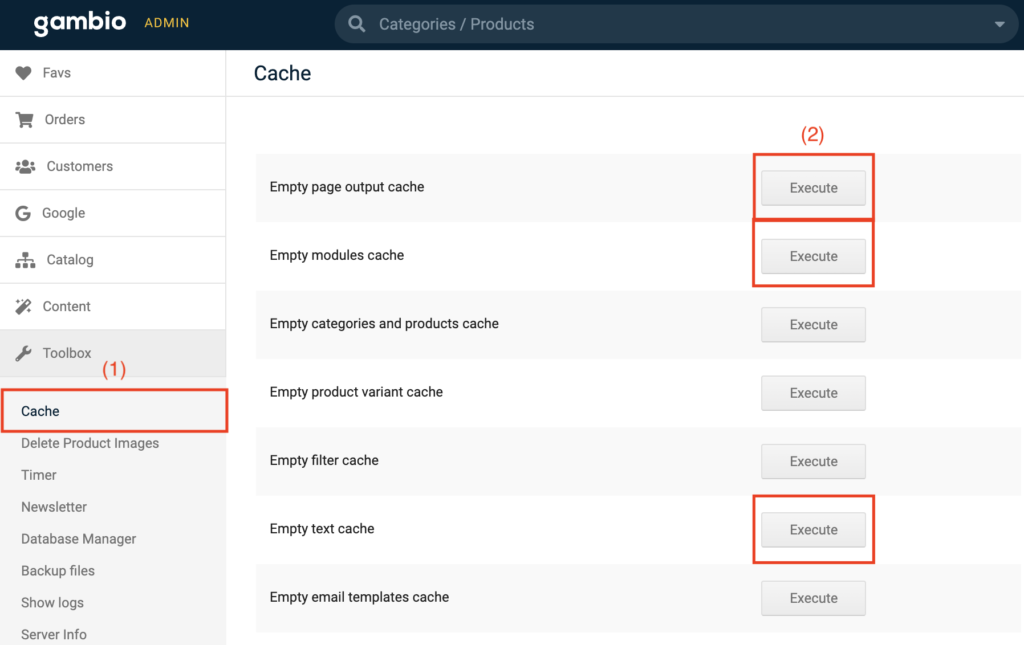
(1) Search the cache area
Navigate to the toolbox and select the first section “Cache”.
(2) Empty cache
Execute the module, output and text cache by clicking on the corresponding buttons.
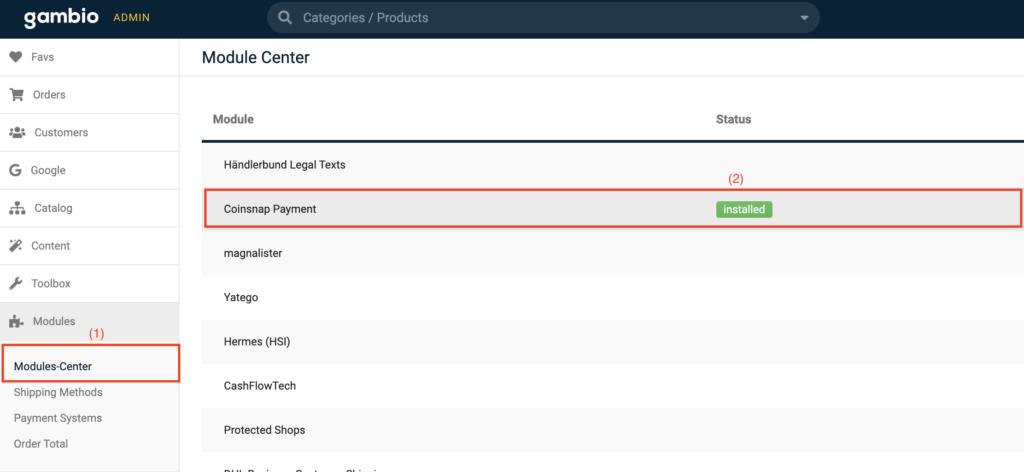
(1) Access to the Modules Centre
Navigate to the “Modules” section and search for “Modules Centre” at the top. Click on it.
(2) Install module
Select “Coinsnap Payment” and proceed to install the module.
(3) Delete cache
After successful installation, return to the cache area and delete the module, output and text cache again.
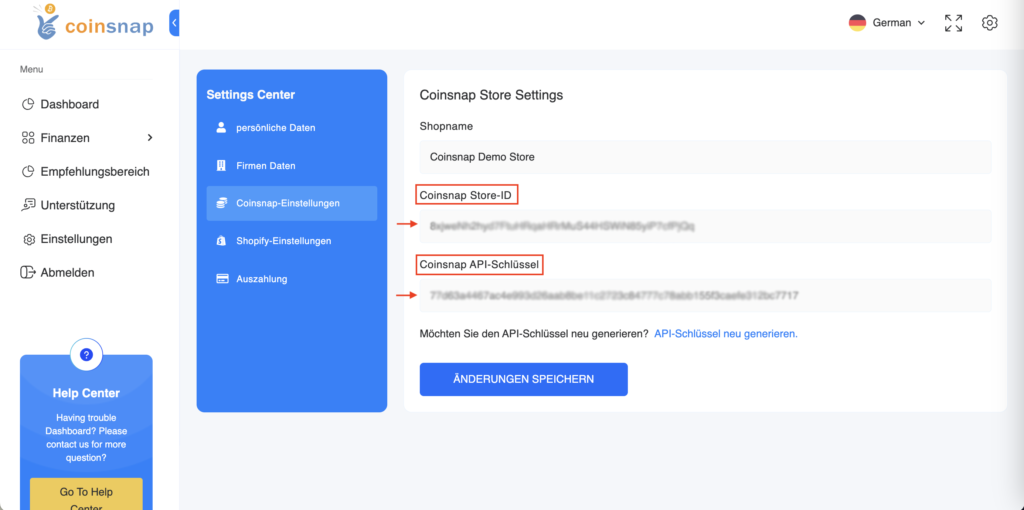
Now log in to your Coinsnap app with your login details and navigate to the settings.
Look for the “Store settings” section in the settings, where you will find your store ID and API key.
Copy these login details for further use.
Navigate to “Modules” -> “Module Centre” -> “Coinsnap Payment” and click on “Edit” again.
(1) Store-ID
Paste the previously copied store ID into the first field.
(2) API-Key
Paste the previously copied API key into the second field.
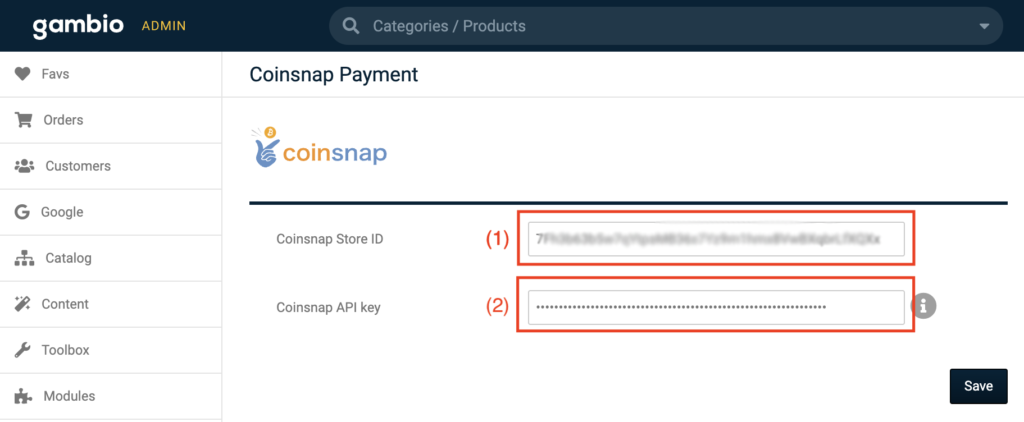
After you have saved the data, your Gambio shop is successfully connected to the Coinsnap app. Let’s now proceed to enable Bitcoin+Lightning payments by following the next instructions:
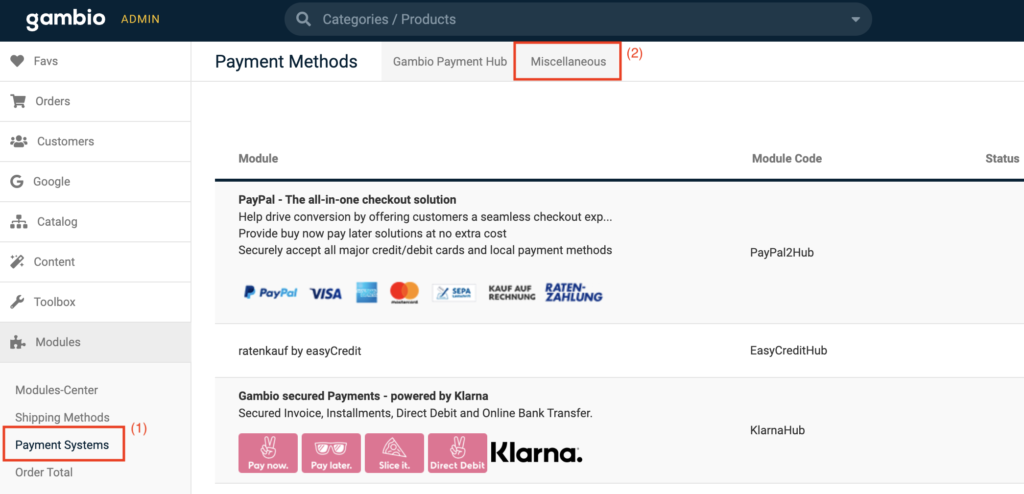
(1) Find the payment settings
Navigate to the section “Modules” -> “Payment systems”.
(2) Open the “Miscellaneous” tab
Click on the “Miscellaneous” tab at the top right-hand side.
Scroll to the bottom of the page where you will find the “Added modules” section. Click on “Bitcoin + Lightning” to start the installation of the “Bitcoin + Lightning” payment method.

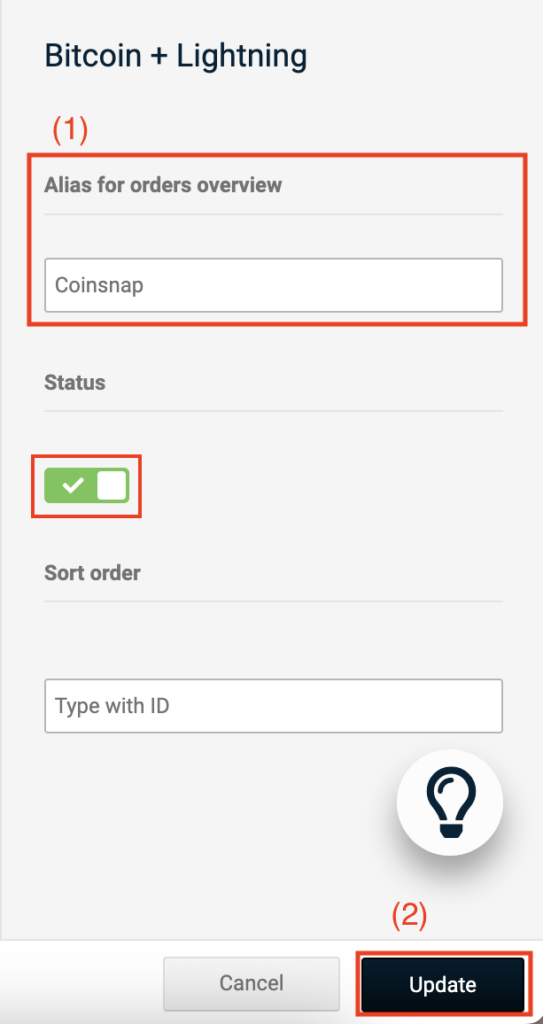
After you have installed the “Bitcoin+Lightning” payment method, continue by clicking on “Edit”.
(1) Enter “Coinsnap”
Enter “Coinsnap” in the “Alias for order overview” field and activate the payment method.
Click on “Update” and the module is ready for use once this step has been completed.