• HOME
  • Features
  • Payment Plugins
    • Online software provider
      • WooCommerce
      • Shopify
      • Shopware
      • Gambio
      • Prestashop
      • Magento
      • Opencart
      • Wix
      • JTL-Store
    • WordPress-Forms
      • Contact Form 7
      • Gravity Forms
      • WPForms
      • GiveWP
    • WordPress-Plugins
      • Easy Digital Downloads
      • Paid Memberships Pro
      • GetPaid
      • BTCPayWall
  • Partner
    • Partner
    • Coinsnap Affiliate Program
    • Agencies and Developers
    • Influencer
  • Support
    • Getting Started
    • Backend
    • API Documentation
    • FAQ
  • Blog
  • Login
  • Search
  • English
    • Deutsch (German)
    • Español (Spanish)
    • Français (French)
    • Русский (Russian)
    • Nederlands (Dutch)
Coinsnap - Lightning Payment ProviderCoinsnap - Lightning Payment Provider
  • HOME
  • Features
  • Payment Plugins
    • Online software provider
      • WooCommerce
      • Shopify
      • Shopware
      • Gambio
      • Prestashop
      • Magento
      • Opencart
      • Wix
      • JTL-Store
    • WordPress-Forms
      • Contact Form 7
      • Gravity Forms
      • WPForms
      • GiveWP
    • WordPress-Plugins
      • Easy Digital Downloads
      • Paid Memberships Pro
      • GetPaid
      • BTCPayWall
  • Partner
    • Partner
    • Coinsnap Affiliate Program
    • Agencies and Developers
    • Influencer
  • Support
    • Getting Started
    • Backend
    • API Documentation
    • FAQ
  • Blog
  • Login
  • Search
  • English
    • Deutsch (German)
    • Español (Spanish)
    • Français (French)
    • Русский (Russian)
    • Nederlands (Dutch)

Coinsnap for GiveWP Payment Plugin

Coinsnap for GiveWP Payment Plugin

Are you collecting donations or fundraising on your website with GiveWP? Then offer your donors the opportunity to donate with Bitcoin and Lightning.

GiveWP is a WordPress plugin that enables non-profit organizations and websites to collect donations. GiveWP provides a user-friendly interface to create donation forms, track fundraising campaigns and integrate various payment gateways to accept payments.

Coinsnap offers Coinsnap for GiveWP, a plugin that can be used to accept donations in the form of Bitcoin and Lightning.

To do this, you need the free GiveWP plugin, which you install on your WordPress. Additionally the plugin Coinsnap for GiveWP.

Coinsnap for GiveWP Plugin

GiveWP Demo Donation Page

If you want to try out for yourself how you can receive donations via Bitcoin and Lightning with GiveWP, visit our GiveWP demo donation page at this link.
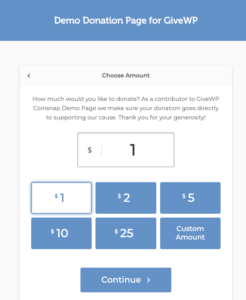
Coinsnap GiveWP demo donation page

GiveWP Plugin for WordPress

You must have installed and configured the GiveWP plugin on your WordPress site.

GiveWP Plugin for WordPress

Installation Coinsnap for GiveWP

The Coinsnap for GiveWP plugin can be downloaded from the Coinsnap GitHub page. We have also applied for inclusion in the WordPress directory, but it takes up to 6 months for WordPress to be activated. Until then, installation is only possible via GitHub.

You can download the Coinsnap for GiveWP plugin from the Coinsnap Github page and install it on your WordPress site.

Visit the Coinsnap Github page. There you will find all the payment modules provided by Coinsnap. Go to Coinsnap for GiveWP.

To do this, go to the Coinsnap Github directory in the Coinsnap for GiveWP section.

There you will find the green button labeled Code. When you click on it, the menu opens and Download ZIP appears. Here you can download the latest version of the Coinsnap plugin to your computer.
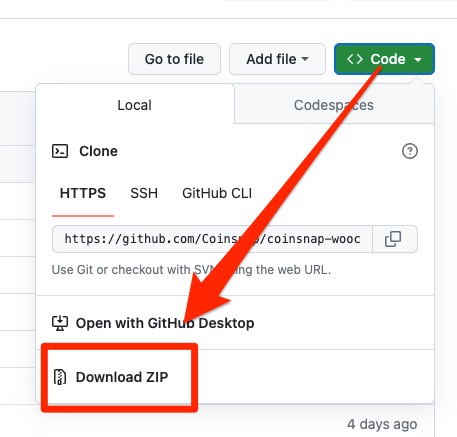

Github Coinsnap Download Coinsnap Plugin
Add Coinsnap Woocommerce plugin

Then use the “Upload plugin” function to install it. Click on “Install now” and the Coinsnap for GiveWP plugin will be added to your WordPress website. It can then be connected to the Coinsnap payment gateway.

Once the Coinsnap for GiveWP plugin is installed and activated, a message will appear asking you to configure the plugin settings.

Configuring Coinsnap for GiveWP

First we need the store ID and the API key from Coinsnap. To do this, we log in to Coinsnap and go to the Setting section.

If you don’t have a Coinsnap account yet, you can create one here.

All you need is an email address and a Lightning Wallet with a Lightning address. You can find out how to create a Coinsnap account under First steps.

In the Store Settings sub-item, we find the Store ID and API Key details. We need this information because both details must be stored with GiveWP.
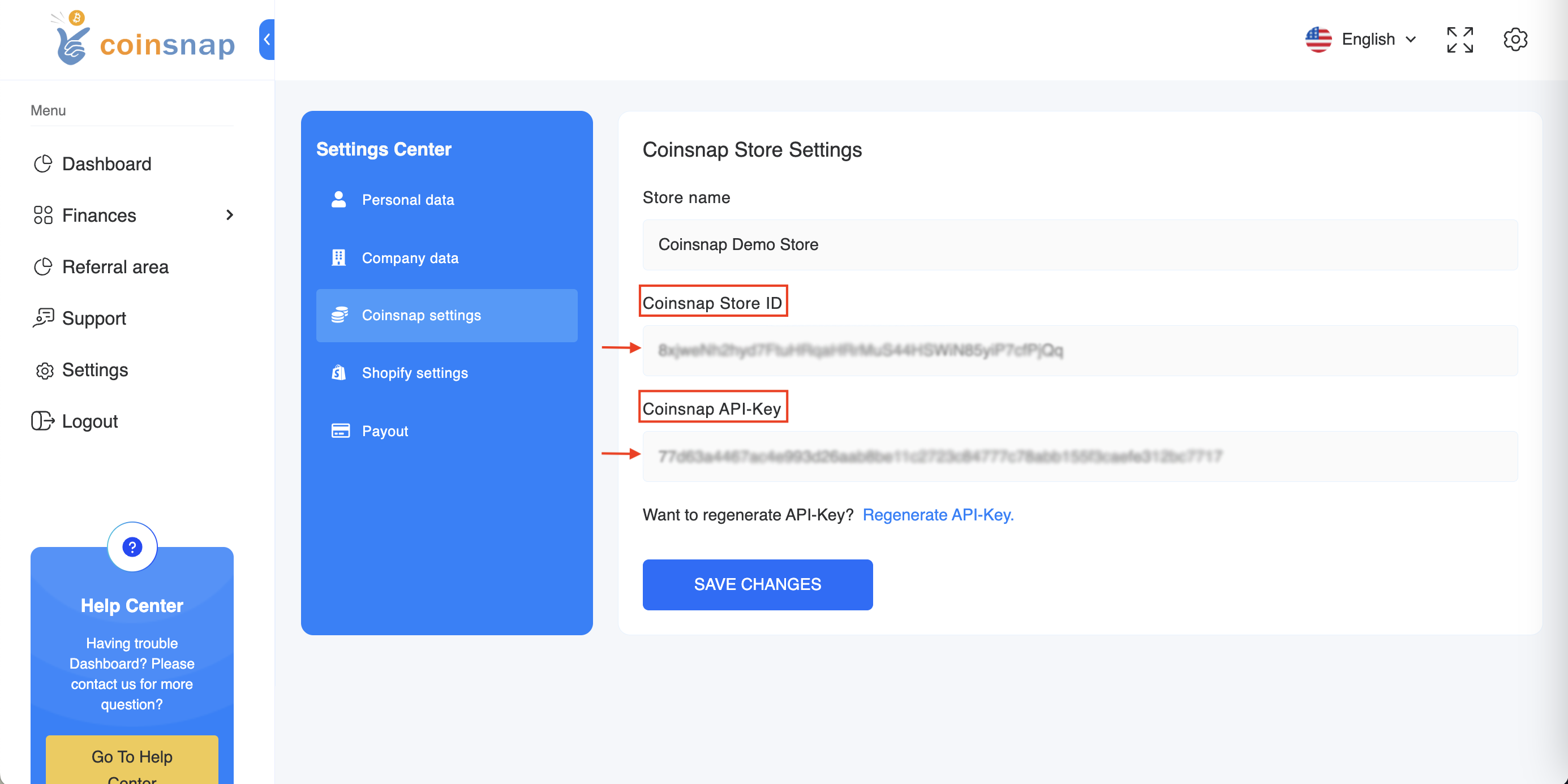
coinsnap-storesettings

With Coinsnap for GiveWP you can easily deposit the Coinsnap Bitcoin Payment Gateway with GiveWP. Your customers can now donate to you with Bitcoin and Lightning.

Share

You also might be interested in

How is a payout in Bitcoin made?

How is a payout in Bitcoin made?

Jul 21, 2024

How is a payout in Bitcoin made? Sales in your[...]

accept lightning payments

Accept Lightning payments

Dec 27, 2023

Accept Lightning payments Do you already accept Bitcoin payments, but[...]

Coinsnap Payment Plugin for WPGetPaid

Coinsnap for GetPaid

Feb 3, 2024

Coinsnap for GetPaid You use Gravity Forms, AffiliateWP, Contact form[...]

Coinsnap – Lightning Payment Provider

Coinsnap is a Lightning Payment Provider and offers Bitcoin and Lightning payment processing for retail stores and online stores.

As a merchant, you only need a Lightning wallet with a Lightning address to receive Bitcoin and Lightning payments from your customers.

Helpful Links

  • Support
  • API Documentation
  • FAQ
  • Payment Plugin

Payment Modules

  • All Payment Plugins
  • WooCommerce
  • Shopify
  • Shopware
  • Gambio
  • Prestashop
  • Magento
  • Opencart
  • BTCPayWall
  • Easy Digital Downloads
  • Paid Memberships Pro
  • Wix
  • GiveWP
  • GetPaid
  • WPForms
  • Gravity Forms
  • Contact Form 7

Company

  • About Coinsnap
  • Media & Press
  • Implentation service
  • Terms and Conditions
  • Privacy Policy
  • Contact

© 2025 · Coinsnap - Snap your Bitcoin

Prev Next
Coinsnap AI Help Chat
x