• HOME
  • Features
  • Payment Plugins
    • Online software provider
      • WooCommerce
      • Shopify
      • Shopware
      • Gambio
      • Prestashop
      • Magento
      • Opencart
      • Wix
      • JTL-Store
    • WordPress-Forms
      • Contact Form 7
      • Gravity Forms
      • WPForms
      • GiveWP
    • WordPress-Plugins
      • Easy Digital Downloads
      • Paid Memberships Pro
      • GetPaid
      • BTCPayWall
  • Partner
    • Partner
    • Coinsnap Affiliate Program
    • Agencies and Developers
    • Influencer
  • Support
    • Getting Started
    • Backend
    • API Documentation
    • FAQ
  • Blog
  • Login
  • Search
  • English
    • Deutsch (German)
    • Español (Spanish)
    • Français (French)
    • Русский (Russian)
    • Nederlands (Dutch)
Coinsnap - Lightning Payment ProviderCoinsnap - Lightning Payment Provider
  • HOME
  • Features
  • Payment Plugins
    • Online software provider
      • WooCommerce
      • Shopify
      • Shopware
      • Gambio
      • Prestashop
      • Magento
      • Opencart
      • Wix
      • JTL-Store
    • WordPress-Forms
      • Contact Form 7
      • Gravity Forms
      • WPForms
      • GiveWP
    • WordPress-Plugins
      • Easy Digital Downloads
      • Paid Memberships Pro
      • GetPaid
      • BTCPayWall
  • Partner
    • Partner
    • Coinsnap Affiliate Program
    • Agencies and Developers
    • Influencer
  • Support
    • Getting Started
    • Backend
    • API Documentation
    • FAQ
  • Blog
  • Login
  • Search
  • English
    • Deutsch (German)
    • Español (Spanish)
    • Français (French)
    • Русский (Russian)
    • Nederlands (Dutch)

Coinsnap for Paid Memberships Pro payment plugin

Coinsnap for Paid Memberships Pro payment plugin

If you sell restricted content and manage membership subscriptions with recurring payments based on Paid Memberships Pro for WordPress, then you can easily integrate payment processing via Bitcoin and Lightning with the Coinsnap plugin.

Simply install the Coinsnap for Paid Memberships Pro plugin, connect it to your Coinsnap account and your customers can pay with Bitcoin and Lightning.

Incoming Bitcoin payments are forwarded directly and credited to your Lightning Wallet.

Coinsnap Payment Plugin for WPGetPaid

Paid Memberships Pro Demo Store

If you would like to try out for yourself how you can receive Bitcoin and Lightning payments with a Paid Memberships Pro Store, visit our Paid Memberships Pro Demo Store at this link.
Coinsnap Woocommerce demo Store

Install the Coinsnap Paid Memberships Pro plugin via Github

Access the Paid Memberships Pro plugin by visiting our GitHub page via the following link.

Obtain the plugin by clicking on the green “Clone or download” button and selecting “Download ZIP” from the dropdown menu.

After you have downloaded the ZIP file from the Github page, log in to your WordPress admin.

Github-logo

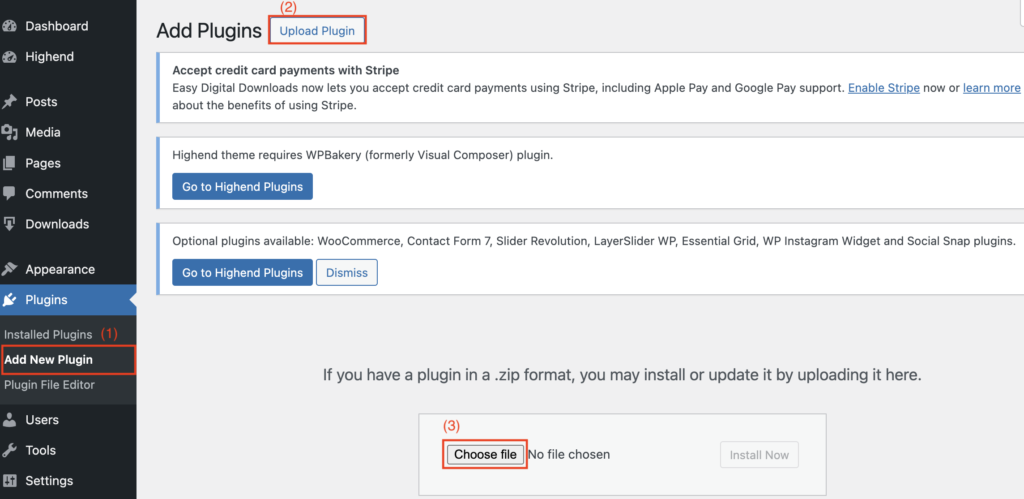
(1) Access to the plugin area

On the WordPress login page, you will find the “Plugin” section on the left-hand side. Navigate to the “Add New Plugin” subsection.

(2) “Upload file” button

Click on the “Upload file” button to start the process. To do this, you need to upload the ZIP file that you previously received from our GitHub page.

(3) Select and upload ZIP file

Select the “Select file” option and select the ZIP file from your computer. This step ensures seamless integration of the plugin into your WordPress environment.
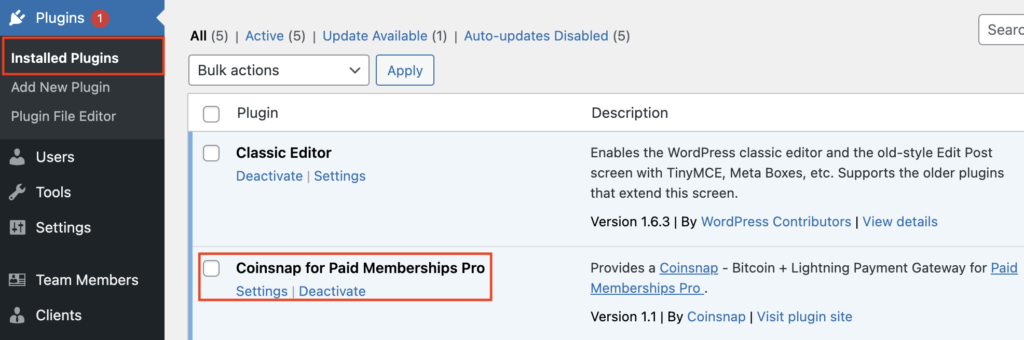
After you have successfully uploaded the ZIP file, navigate to the “Installed plugins” section and make sure that the “Coinsnap for Paid Memberships Pro” plugin is activated.

coinsnap-storesettings

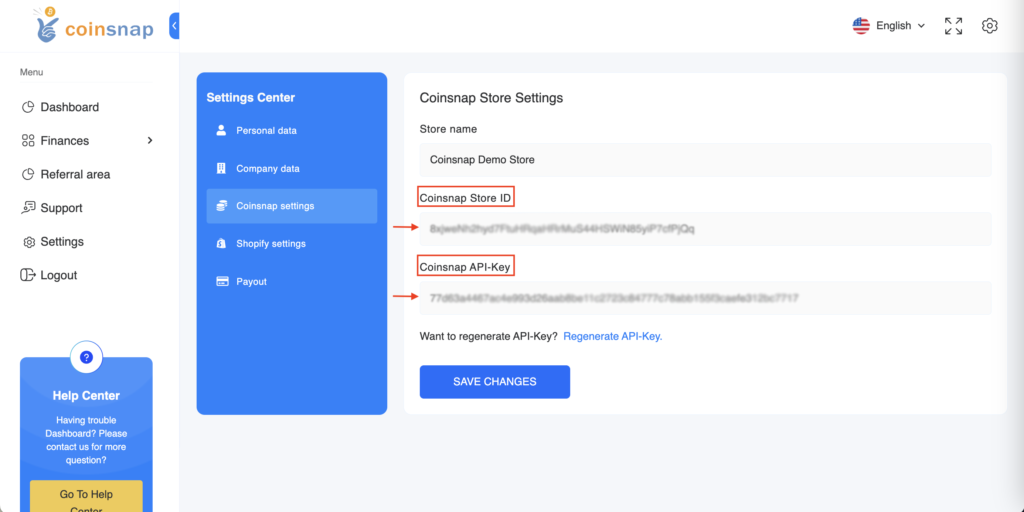
Enter your login details in your Coinsnap app and navigate to the settings.

Look for the “Store settings” section in the settings, where you can access your store ID and API key.

Copy these login details for future use.

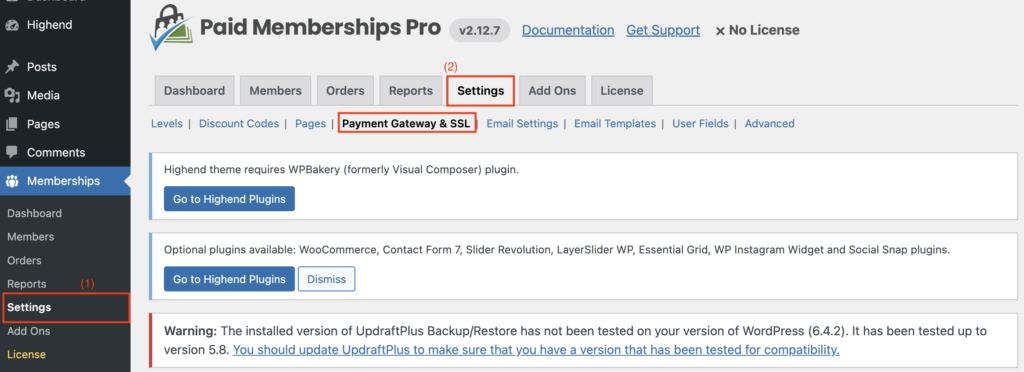
(1) Open the “Memberships” section

Find the “Memberships” section on the left-hand side of the WordPress login page and go to the “Settings” subsection.

(2) Navigate to the “Payment Gateway & SSL” section

Within the “Settings” subsection on the right-hand side, search for the “Payment Gateway & SSL” section and open it. Click on it to continue with the configuration. Scroll down and select Coinsnap.
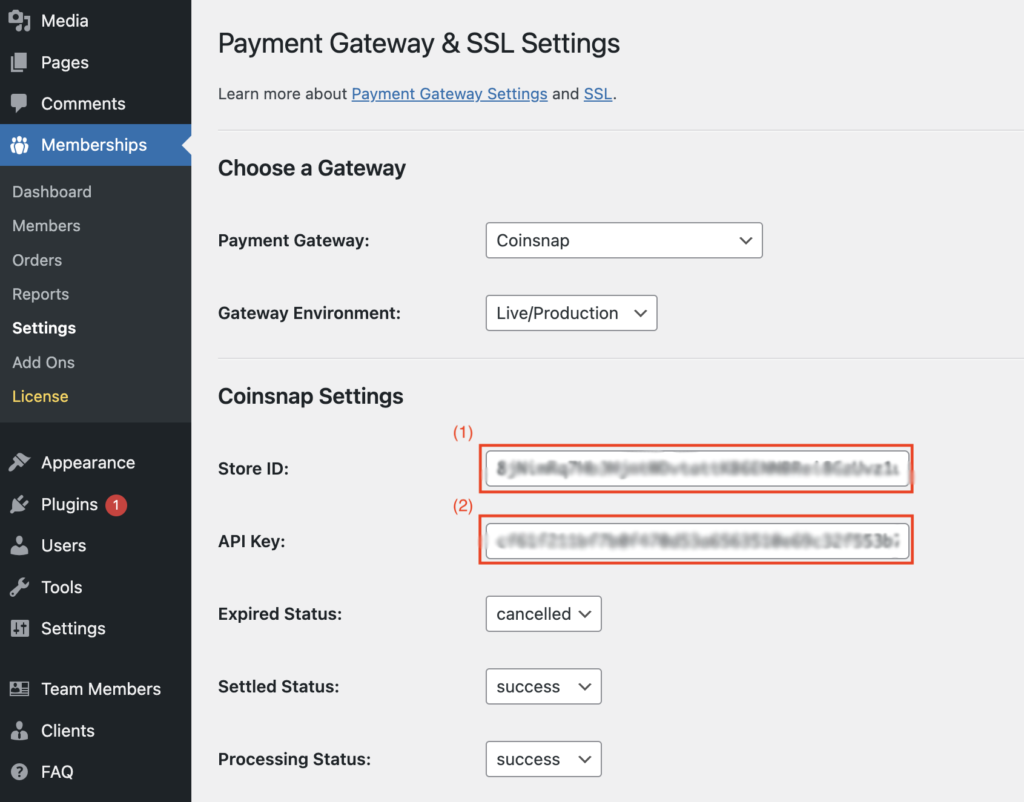
(1) Enter Shop-ID

Retrieve the store ID from the previously copied information within the Coinsnap app. Enter this information in the first field provided.

(2) Enter API key

Get the API key from the information previously copied into the Coinsnap app. Enter this information in the second field provided.

Make sure to synchronise the invoice statuses for “Expired”, “Billed” and “In Progress” to maintain accurate and up-to-date records.

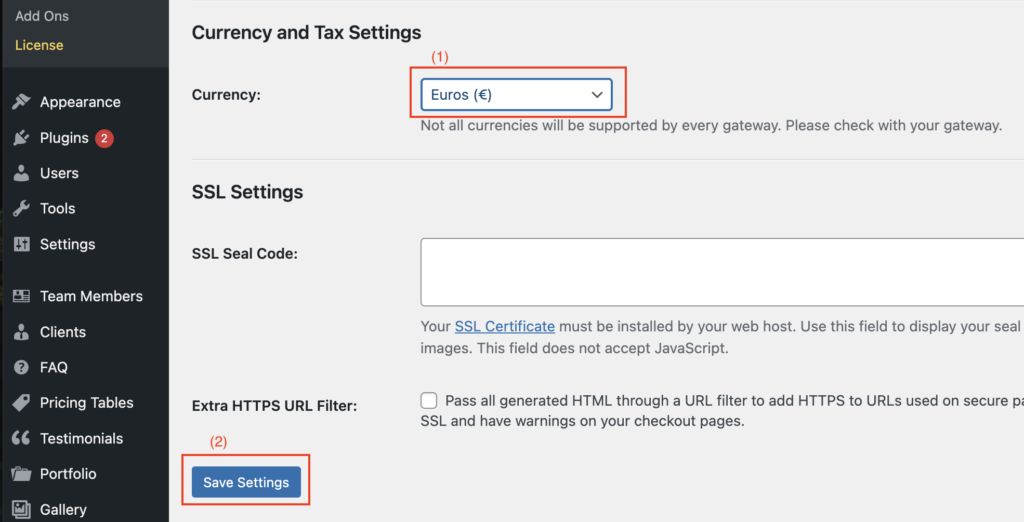
(1) Currency and tax configuration

Select the desired currency from the available list. Please note that Coinsnap does not currently support the following currencies: “EUR”, “USD”, “CAD”, “JPY”, “GBP” and “CHF”.

(2) Confirm the changes

To apply and save all changes, click on the blue button at the end of the process.

You have successfully completed the integration with the Coinsnap app!
Share

You also might be interested in

Coinsnap: Bitcoin-Lightning Bezahlung für Contact Form 7 verfügbar!

Coinsnap now also enables Bitcoin Lightning payment in Contact Form 7

Aug 22, 2024

With Coinsnap, website operators can now use Contact Form 7[...]

Payout to bank account with DFX

Payout to bank account with DFX

Feb 12, 2024

Payout to bank account with DFX You use the service[...]

Coinsnap Web Point of Sale Bitcoin-Lightning Payment Solution

Coinsnap launches Web-PoS Bitcoin Lightning Payment Solution

Sep 5, 2024

5.9.2024 – Coinsnap now offers a new, innovative way for[...]

Coinsnap – Lightning Payment Provider

Coinsnap is a Lightning Payment Provider and offers Bitcoin and Lightning payment processing for retail stores and online stores.

As a merchant, you only need a Lightning wallet with a Lightning address to receive Bitcoin and Lightning payments from your customers.

Helpful Links

  • Support
  • API Documentation
  • FAQ
  • Payment Plugin

Payment Modules

  • All Payment Plugins
  • WooCommerce
  • Shopify
  • Shopware
  • Gambio
  • Prestashop
  • Magento
  • Opencart
  • BTCPayWall
  • Easy Digital Downloads
  • Paid Memberships Pro
  • Wix
  • GiveWP
  • GetPaid
  • WPForms
  • Gravity Forms
  • Contact Form 7

Company

  • About Coinsnap
  • Media & Press
  • Implentation service
  • Terms and Conditions
  • Privacy Policy
  • Contact

© 2025 · Coinsnap - Snap your Bitcoin

Prev Next
Coinsnap AI Help Chat
x