• HOME
  • Features
  • Payment Plugins
    • Online software provider
      • WooCommerce
      • Shopify
      • Shopware
      • Gambio
      • Prestashop
      • Magento
      • Opencart
      • Wix
      • JTL-Store
    • WordPress-Forms
      • Contact Form 7
      • Gravity Forms
      • WPForms
      • GiveWP
    • WordPress-Plugins
      • Easy Digital Downloads
      • Paid Memberships Pro
      • GetPaid
      • BTCPayWall
  • Partner
    • Partner
    • Coinsnap Affiliate Program
    • Agencies and Developers
    • Influencer
  • Support
    • Getting Started
    • Backend
    • API Documentation
    • FAQ
  • Blog
  • Login
  • Search
  • English
    • Deutsch (German)
    • Español (Spanish)
    • Français (French)
    • Русский (Russian)
    • Nederlands (Dutch)
Coinsnap - Lightning Payment ProviderCoinsnap - Lightning Payment Provider
  • HOME
  • Features
  • Payment Plugins
    • Online software provider
      • WooCommerce
      • Shopify
      • Shopware
      • Gambio
      • Prestashop
      • Magento
      • Opencart
      • Wix
      • JTL-Store
    • WordPress-Forms
      • Contact Form 7
      • Gravity Forms
      • WPForms
      • GiveWP
    • WordPress-Plugins
      • Easy Digital Downloads
      • Paid Memberships Pro
      • GetPaid
      • BTCPayWall
  • Partner
    • Partner
    • Coinsnap Affiliate Program
    • Agencies and Developers
    • Influencer
  • Support
    • Getting Started
    • Backend
    • API Documentation
    • FAQ
  • Blog
  • Login
  • Search
  • English
    • Deutsch (German)
    • Español (Spanish)
    • Français (French)
    • Русский (Russian)
    • Nederlands (Dutch)
coinsnap for opencart

Coinsnap for Opencart payment plugin

Coinsnap for Opencart payment plugin

OpenCart is an open source e-commerce platform that enables companies to set up and manage their online shops.

OpenCart plugins, also known as extensions, are additional software that improve the functionality of the OpenCart platform. These extensions can add various features and capabilities to an OpenCart shop, making it more customisable and able to meet specific business needs.

With the Coinsnap payment plugin for Opencart, shop operators can effortlessly process Bitcoin and Lightning payments from their customers.

This guide provides detailed instructions to facilitate the seamless integration of Opencart with the Coinsnap app.

coinsnap for opencart

Opencart Demo Store

If you want to try out for yourself how you can receive Bitcoin and Lightning payments with an Opencart Store, visit our Opencart Demo Store at this link.

Install the Coinsnap Opencart plugin via Github

Access the EDD plugin by visiting our GitHub page via the following link.

Obtain the plugin by clicking on the green “Clone or download” button and selecting “Download ZIP” from the dropdown menu.

Github-logo
opencart payment plugin for coinsnap

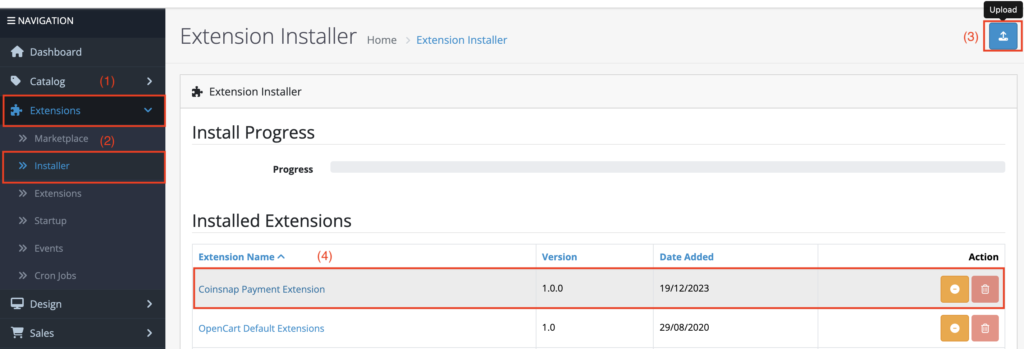
(1) Navigate to extensions

Find and select the “Extensions” section on the left-hand side of the Opencart login page.

(2) Access to the installer

In the “Extensions” section, find the “Installer” subsection and click on it to continue.

(3) Upload ZIP file

On the right-hand side you will find a blue “Upload” button. Click on it and proceed to upload the downloaded file.

(4) Install Coinsnap payment extensions

Click on the button to install the Coinsnap Payment Extensions. After successful installation, the button should now be highlighted in orange.
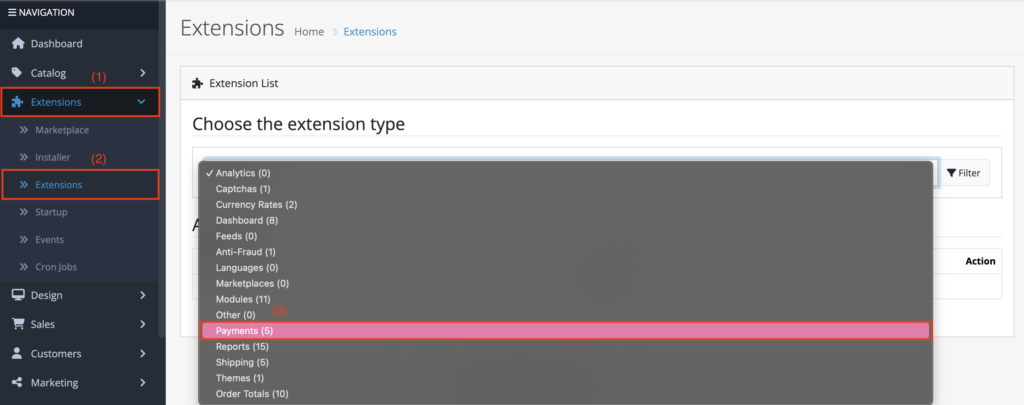
(1) Navigate to extensions

Find and select the “Extensions” section on the left-hand side of the Opencart login page.

(2) Navigate to the subsection Extensions

Within the “Extensions” section, search for the “Extensions” subsection and click on it to continue.

(3) Payments

Under “Select the extension type”, search for the payment category and select it.

opencart payment plugin for coinsnap

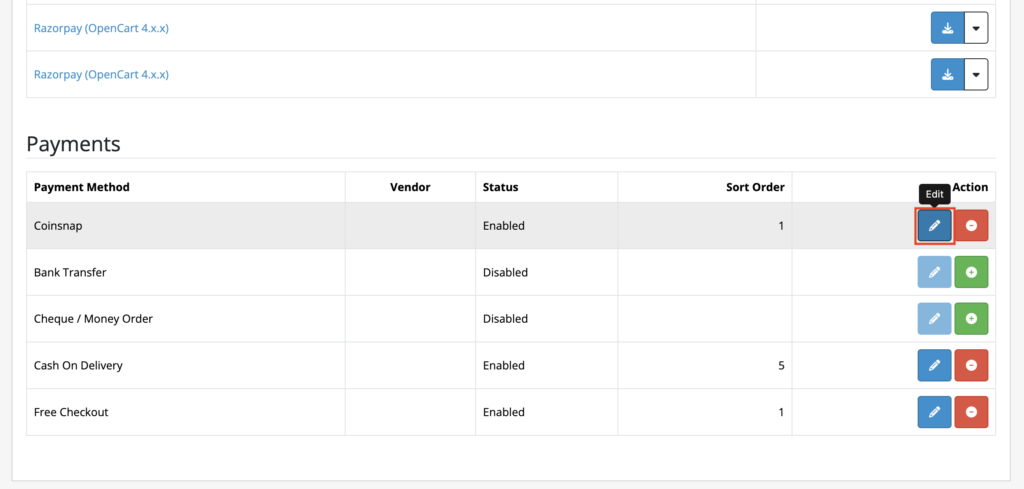
After you have selected “Payments”, scroll down to find Coinsnap as a payment method.

Click on the “Edit” button on the right-hand side.

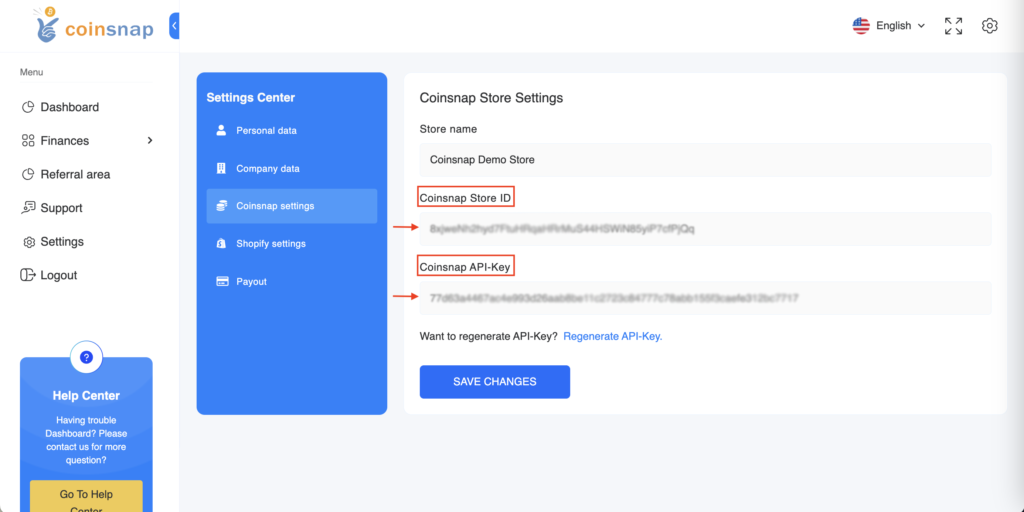
Enter your login details in your Coinsnap app and navigate to the settings.

Look for the “Store settings” section in the settings, where you can access your store ID and API key.

Copy these login details for future use.
coinsnap-storesettings
opencart payment plugin for coinsnap

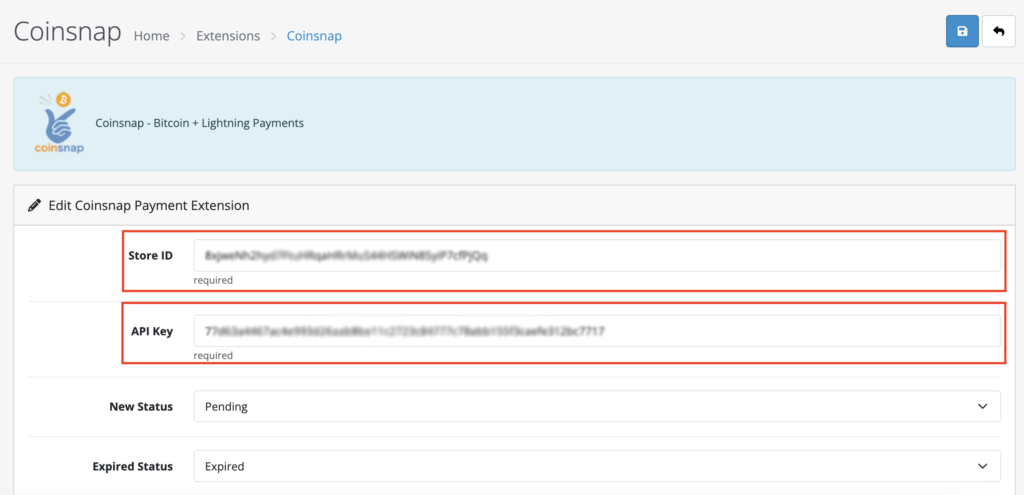
If you click on the “Edit” button, fields are displayed in which you must enter the previously copied store ID and the API key.

Fill in these fields and your integration with the Coinsnap app will be successfully completed. You are now ready to accept Bitcoin+Lightning payments.


Share

You also might be interested in

Coinsnap Payment Plugin for easydigitaldownload

Coinsnap for Easy Digital Downloads payment plugin

Jan 19, 2024

Coinsnap for Easy Digital Downloads payment plugin If you sell[...]

Coinsnap Payment Plugin for WPGetPaid

Coinsnap for GetPaid

Feb 3, 2024

Coinsnap for GetPaid You use Gravity Forms, AffiliateWP, Contact form[...]

Wallet of Satoshi - Lightning Wallet with Lightning address

Wallet of Satoshi – Bitcoin wallet with Lightning address

Dec 17, 2023

Wallet of Satoshi – Bitcoin wallet with Lightning address The[...]

Coinsnap – Lightning Payment Provider

Coinsnap is a Lightning Payment Provider and offers Bitcoin and Lightning payment processing for retail stores and online stores.

As a merchant, you only need a Lightning wallet with a Lightning address to receive Bitcoin and Lightning payments from your customers.

Helpful Links

  • Support
  • API Documentation
  • FAQ
  • Payment Plugin

Payment Modules

  • All Payment Plugins
  • WooCommerce
  • Shopify
  • Shopware
  • Gambio
  • Prestashop
  • Magento
  • Opencart
  • BTCPayWall
  • Easy Digital Downloads
  • Paid Memberships Pro
  • Wix
  • GiveWP
  • GetPaid
  • WPForms
  • Gravity Forms
  • Contact Form 7

Company

  • About Coinsnap
  • Media & Press
  • Implentation service
  • Terms and Conditions
  • Privacy Policy
  • Contact

© 2026 · Coinsnap - Snap your Bitcoin

Prev Next
Coinsnap AI Help Chat
x