• HOME
  • Features
  • Payment Plugins
    • Online software provider
      • WooCommerce
      • Shopify
      • Shopware
      • Gambio
      • Prestashop
      • Magento
      • Opencart
      • Wix
      • JTL-Store
    • WordPress-Forms
      • Contact Form 7
      • Gravity Forms
      • WPForms
      • GiveWP
    • WordPress-Plugins
      • Easy Digital Downloads
      • Paid Memberships Pro
      • GetPaid
      • BTCPayWall
  • Partner
    • Partner
    • Coinsnap Affiliate Program
    • Agencies and Developers
    • Influencer
  • Support
    • Getting Started
    • Backend
    • API Documentation
    • FAQ
  • Blog
  • Login
  • Search
  • English
    • Deutsch (German)
    • Español (Spanish)
    • Français (French)
    • Русский (Russian)
    • Nederlands (Dutch)
Coinsnap - Lightning Payment ProviderCoinsnap - Lightning Payment Provider
  • HOME
  • Features
  • Payment Plugins
    • Online software provider
      • WooCommerce
      • Shopify
      • Shopware
      • Gambio
      • Prestashop
      • Magento
      • Opencart
      • Wix
      • JTL-Store
    • WordPress-Forms
      • Contact Form 7
      • Gravity Forms
      • WPForms
      • GiveWP
    • WordPress-Plugins
      • Easy Digital Downloads
      • Paid Memberships Pro
      • GetPaid
      • BTCPayWall
  • Partner
    • Partner
    • Coinsnap Affiliate Program
    • Agencies and Developers
    • Influencer
  • Support
    • Getting Started
    • Backend
    • API Documentation
    • FAQ
  • Blog
  • Login
  • Search
  • English
    • Deutsch (German)
    • Español (Spanish)
    • Français (French)
    • Русский (Russian)
    • Nederlands (Dutch)

Coinsnap for Magento payment plugin

Coinsnap for Magento payment plugin

Magento is an open source e-commerce platform that enables companies to create and manage online shops. A Magento plugin, also known as an extension, is a piece of software that extends or improves the functionality of the Magento platform.

These plugins are developed to add specific features, improve performance or integrate with third-party services to provide a more customised and feature-rich e-commerce experience. With the Coinsnap payment plugin for Magento, shop operators can accept Bitcoin and Lightning payments from their customers.

The included text contains a comprehensive guide to help you seamlessly integrate Magento with the Coinsnap app.

coinsnap for Magento

Magento Demo Store

Coinsnap Woocommerce demo Store

If you want to try out for yourself how you can receive Bitcoin and Lightning payments with a Magento store, visit our Magento Demo Store at this link.

Install the Coinsnap Magento plugin via Github

The Magento plugin can be downloaded from the GitHub page at this link.

The installation is very simple, but you need to know how to use FTP and SSH clients to complete the whole process.

Download the ZIP file by clicking on the green button “Clone or download” and “Download ZIP”.

Unzip the file and upload the entire “Coinsnap” directory to the app/code folder.

Execute the following commands in the shell (with an SSH client) in the root directory of the website:

Github-logo
  1. php bin/magento module:enable Coinsnap_Payment

  2. php bin/magento setup:upgrade

  3. php bin/magento setup:di:compile

You can then log in to the Magento dashboard.

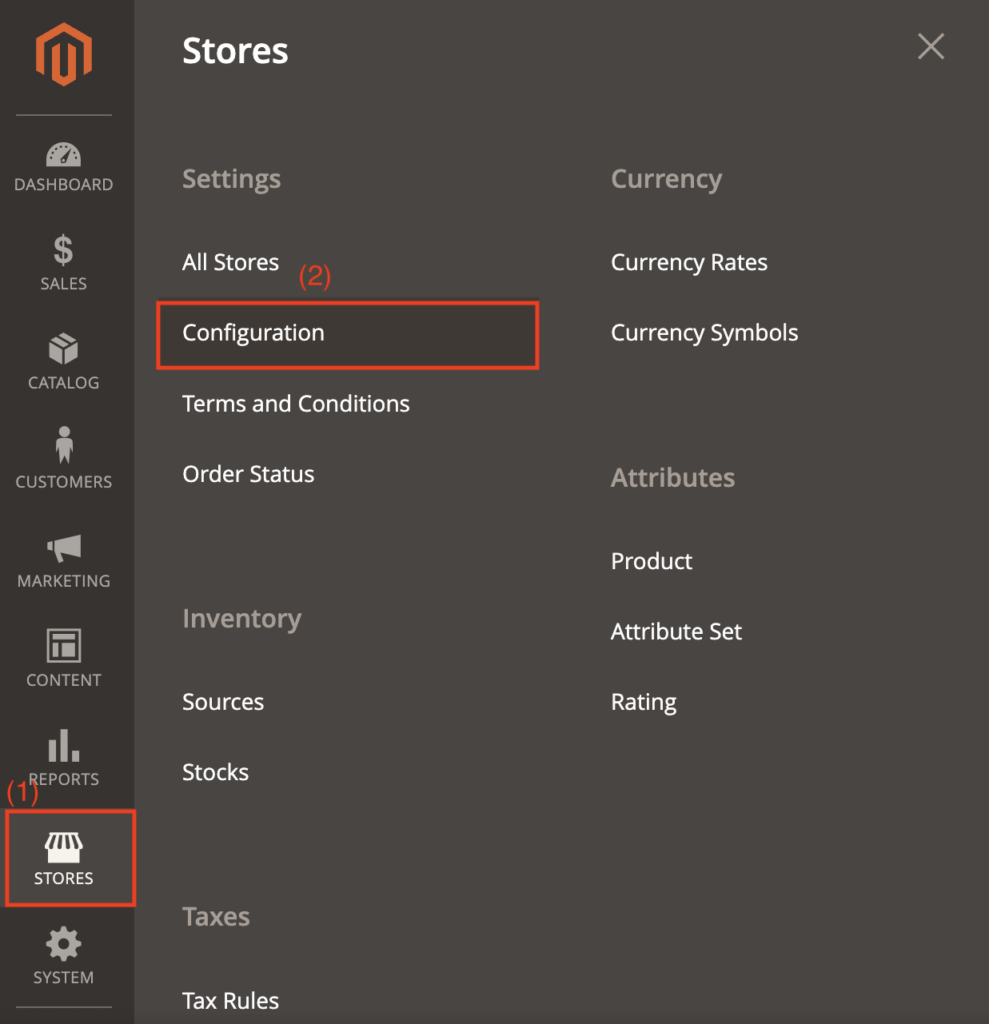
(1) Navigate to stores

Find the “Stores” section on the left-hand side of the Magento login page and click on it.

(2) Access to the configuration

In the “Stores” section, search for the “Configuration” subsection. Click on it to continue.
Magento payment plugin for coinsnap

Search for the “Sales” category in the “Configuration” section and select it.

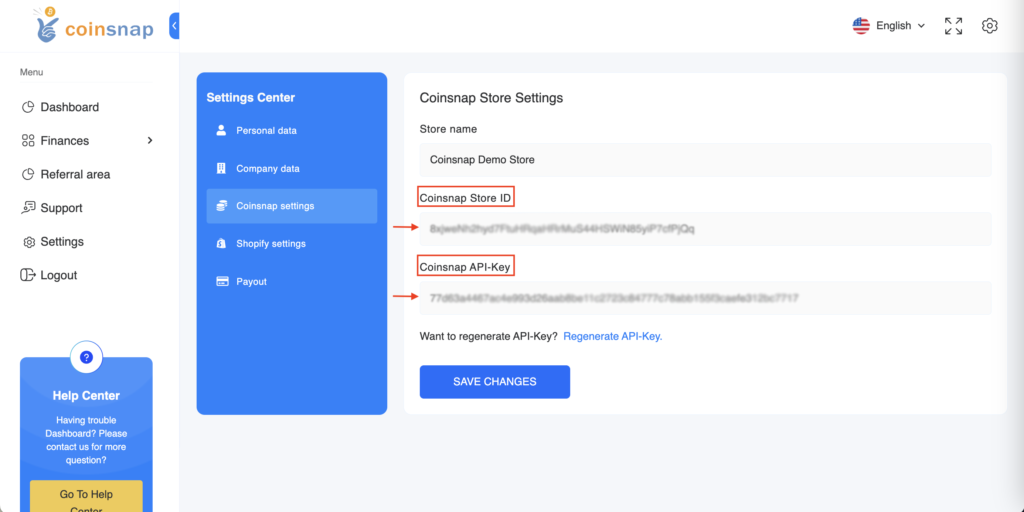
Now enter your login details in your Coinsnap app and go to the settings.

In the settings, you will find the “Store settings” section, where you can retrieve your store ID and API key.

Copy these login details for future use.
coinsnap-storesettings
Magento payment plugin for coinsnap

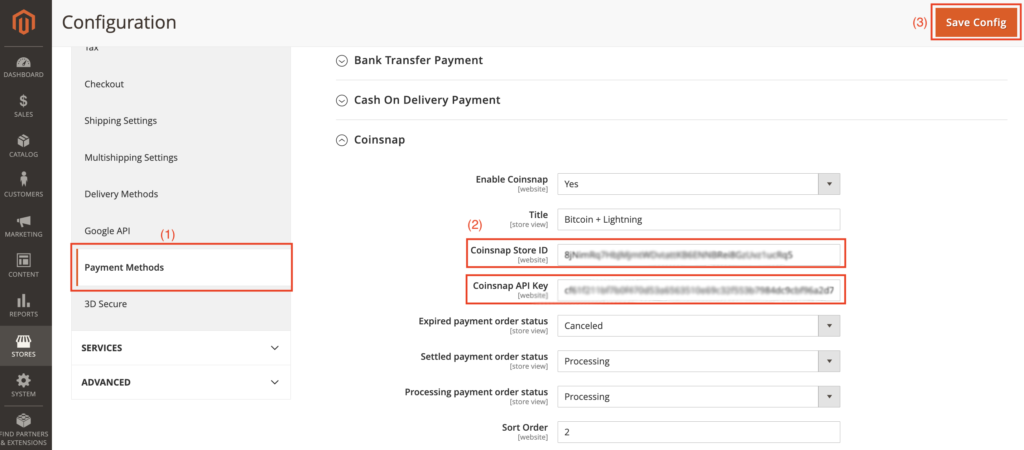
(1) Configuration of the payment methods

Navigate to the “Sales” section and search for the “Payment methods” option. Click on them.

(2) Integration of the Coinsnap app data

Enter the store ID and API key that you copied from the Coinsnap app into the corresponding fields.

(3) Save changes

Click on the “Save” button to finalise the integration of your Magento plugin with the Coinsnap app. Now you’re ready to accept Bitcoin+Lightning payments.

Feel free to change the other fields visible in Magento (similar to the image), but make sure that the “Title” field retains the name “Bitcoin+Lightning”.


Share

You also might be interested in

Coinsnap for GiveWP Plugin

Coinsnap for GiveWP Payment Plugin

Feb 7, 2024

Coinsnap for GiveWP Payment Plugin Are you collecting donations or[...]

Coinsnap Payment Plugin for WPGetPaid
Coinsnap Payment Plugin for paidmembershippro

Coinsnap for Paid Memberships Pro payment plugin

Jan 19, 2024

Coinsnap for Paid Memberships Pro payment plugin If you sell[...]

How do I get a Lightning Wallet with a Lightning address?

How do I get a Lightning Wallet?

Jun 3, 2024

How do I get a Lightning Wallet with a Lightning[...]

Coinsnap – Lightning Payment Provider

Coinsnap is a Lightning Payment Provider and offers Bitcoin and Lightning payment processing for retail stores and online stores.

As a merchant, you only need a Lightning wallet with a Lightning address to receive Bitcoin and Lightning payments from your customers.

Helpful Links

  • Support
  • API Documentation
  • FAQ
  • Payment Plugin

Payment Modules

  • All Payment Plugins
  • WooCommerce
  • Shopify
  • Shopware
  • Gambio
  • Prestashop
  • Magento
  • Opencart
  • BTCPayWall
  • Easy Digital Downloads
  • Paid Memberships Pro
  • Wix
  • GiveWP
  • GetPaid
  • WPForms
  • Gravity Forms
  • Contact Form 7

Company

  • About Coinsnap
  • Media & Press
  • Implentation service
  • Terms and Conditions
  • Privacy Policy
  • Contact

© 2025 · Coinsnap - Snap your Bitcoin

Prev Next
Coinsnap AI Help Chat
x