
• HOME
  • Features
  • Payment Plugins
    • Online software provider
      • WooCommerce
      • Shopify
      • Shopware
      • Gambio
      • Prestashop
      • Magento
      • Opencart
      • Wix
      • JTL-Store
    • WordPress-Forms
      • Contact Form 7
      • Gravity Forms
      • WPForms
      • GiveWP
    • WordPress-Plugins
      • Easy Digital Downloads
      • Paid Memberships Pro
      • GetPaid
      • BTCPayWall
  • Partner
    • Partner
    • Coinsnap Affiliate Program
    • Agencies and Developers
    • Influencer
  • Support
    • Getting Started
    • Backend
    • API Documentation
    • FAQ
  • Blog
  • Login
  • Search
  • English
    • Deutsch (German)
    • Español (Spanish)
    • Français (French)
    • Русский (Russian)
Coinsnap - Lightning Payment ProviderCoinsnap - Lightning Payment Provider
  • HOME
  • Features
  • Payment Plugins
    • Online software provider
      • WooCommerce
      • Shopify
      • Shopware
      • Gambio
      • Prestashop
      • Magento
      • Opencart
      • Wix
      • JTL-Store
    • WordPress-Forms
      • Contact Form 7
      • Gravity Forms
      • WPForms
      • GiveWP
    • WordPress-Plugins
      • Easy Digital Downloads
      • Paid Memberships Pro
      • GetPaid
      • BTCPayWall
  • Partner
    • Partner
    • Coinsnap Affiliate Program
    • Agencies and Developers
    • Influencer
  • Support
    • Getting Started
    • Backend
    • API Documentation
    • FAQ
  • Blog
  • Login
  • Search
  • English
    • Deutsch (German)
    • Español (Spanish)
    • Français (French)
    • Русский (Russian)

Shopify Integration Service

Integrate Coinsnap with Shopify

With the Shopify Integration Service, we integrate Bitcoin and Lightning payments into your Shopify store free of charge.

To be able to accept Bitcoin and Lightning payments in your Shopify store, the Shopify store must be connected to Coinsnap.

You can make this connection yourself. We have described how to do this in detail in the article Coinsnap Shopify App.

If you don’t want to make this connection yourself, you can have it done by a partner company.

In this article, we describe how you can have this integration carried out by Coincharge. This integration service is free of charge during the introductory phase.

shopify payment plugin

Create Staff

In order for Coincharge to be able to make the settings, the user shopify@coincharge.io must be stored as an employee in your Shopify store.

After successfully setting up Coinsnap in your Shopify store, the employee is no longer needed and can be removed later.

Shopify settings

When you log in to Shopify, you will find the Settings item at the bottom of the left-hand menu bar.

Click on it there.

You will then be taken to the settings of your Shopify store and there to the Users and permissions menu item.
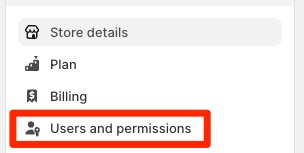
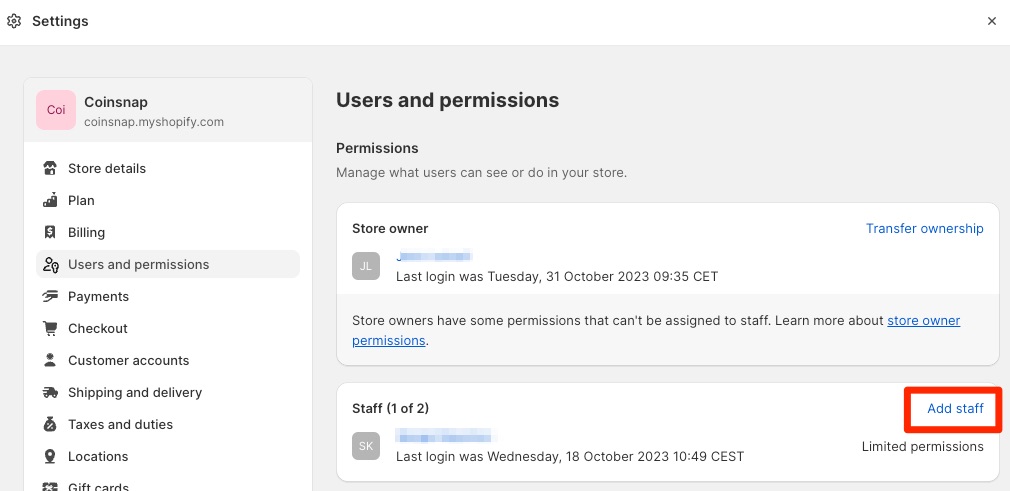
shopify users permissions
shopify add staff

In this area, you can add staff and assign them various authorizations. To add an staff, click on Add staff.

There you can store the user shopify@coincharge.io. For example, you can enter Coincharge and Support in the First Name and Last Name fields.
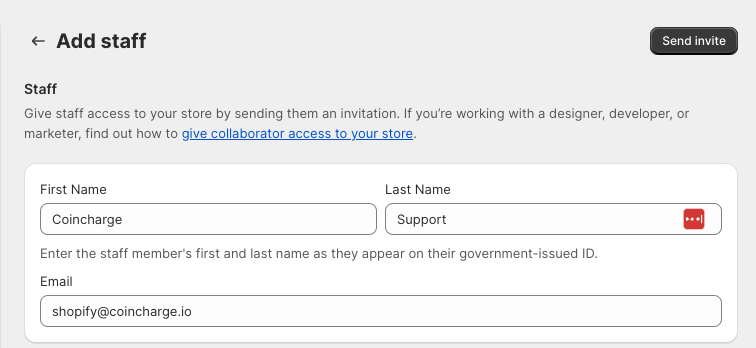
shopify add staff

Assigning authorizations

Authorizations must be set up after the staff has been deposited at shopify@coincharge.io. This allows the registered staff to make settings and changes in the Shopify store. The staff and the assigned authorizations are only required for setting up the app. Once set up, the staff can be deleted again, including the corresponding authorizations, and no longer has any insight into the store’s activities.
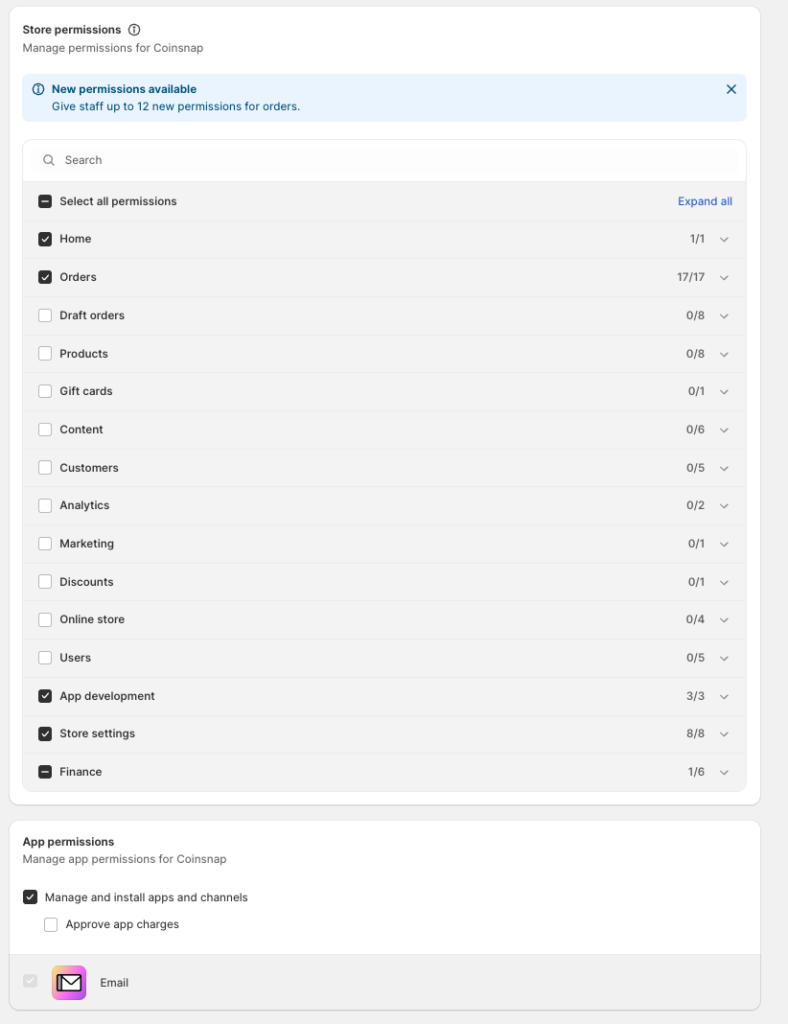
Shopify store and app permission

Store Permissions

In the store permissions, corresponding authorizations can be assigned for individual areas. You can make it easy for yourself and select “Select all permissions” in the first item. However, it is not necessary to assign corresponding authorizations for all areas.

The authorizations for the areas with the corresponding sub-areas for Home, Orders, App development and Store Settings are required.

In the Finance area, the subcategory Manage other payment settings.

App Permissions

Since Coinsnap is stored as an app, app authorizations are still required.

Here it is sufficient if the app authorization allows “Manage and install apps and channels”.

Then click on Send invite.
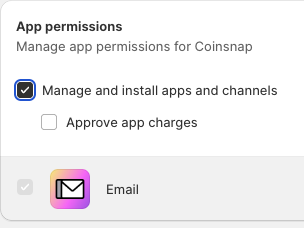
shopify app permissions

After clicking on “Send invitation”, we will be informed by e-mail that we have been registered as a new employee.

Now the installation can begin.

After successfully setting up Coinsnap in your Shopify store, the employee is no longer needed and must be deleted.


Share

You also might be interested in

accept lightning payments

Accept Lightning payments

Dec 27, 2023

Accept Lightning payments Do you already accept Bitcoin payments, but[...]

Coinsnap for Prestashop Payment Plugin

Coinsnap for Prestashop payment plugin

Nov 22, 2023

Coinsnap for Prestashop payment plugin PrestaShop is a leading French[...]

Coinsnap: Bitcoin-Lightning Bezahlung für Contact Form 7 verfügbar!

Coinsnap now also enables Bitcoin Lightning payment in Contact Form 7

Aug 22, 2024

With Coinsnap, website operators can now use Contact Form 7[...]

Coinsnap – Lightning Payment Provider

Coinsnap is a Lightning Payment Provider and offers Bitcoin and Lightning payment processing for retail stores and online stores.

As a merchant, you only need a Lightning wallet with a Lightning address to receive Bitcoin and Lightning payments from your customers.

Helpful Links

  • Support
  • API Documentation
  • FAQ
  • Payment Plugin

Payment Modules

  • All Payment Plugins
  • WooCommerce
  • Shopify
  • Shopware
  • Gambio
  • Prestashop
  • Magento
  • Opencart
  • BTCPayWall
  • Easy Digital Downloads
  • Paid Memberships Pro
  • Wix
  • GiveWP
  • GetPaid
  • WPForms
  • Gravity Forms
  • Contact Form 7

Company

  • About Coinsnap
  • Media & Press
  • Implentation service
  • Terms and Conditions
  • Privacy Policy
  • Contact

© 2025 · Coinsnap - Snap your Bitcoin

Prev Next
Coinsnap AI Help Chat
x