• HOME
  • Features
  • Payment Plugins
    • Online software provider
      • WooCommerce
      • Shopify
      • Shopware
      • Gambio
      • Prestashop
      • Magento
      • Opencart
      • Wix
      • JTL-Store
    • WordPress-Forms
      • Contact Form 7
      • Gravity Forms
      • WPForms
      • GiveWP
    • WordPress-Plugins
      • Easy Digital Downloads
      • Paid Memberships Pro
      • GetPaid
      • BTCPayWall
  • Partner
    • Partner
    • Coinsnap Affiliate Program
    • Agencies and Developers
    • Influencer
  • Support
    • Getting Started
    • Backend
    • API Documentation
    • FAQ
  • Blog
  • Login
  • Search
  • English
    • Deutsch (German)
    • Español (Spanish)
    • Français (French)
    • Русский (Russian)
    • Nederlands (Dutch)
Coinsnap - Lightning Payment ProviderCoinsnap - Lightning Payment Provider
  • HOME
  • Features
  • Payment Plugins
    • Online software provider
      • WooCommerce
      • Shopify
      • Shopware
      • Gambio
      • Prestashop
      • Magento
      • Opencart
      • Wix
      • JTL-Store
    • WordPress-Forms
      • Contact Form 7
      • Gravity Forms
      • WPForms
      • GiveWP
    • WordPress-Plugins
      • Easy Digital Downloads
      • Paid Memberships Pro
      • GetPaid
      • BTCPayWall
  • Partner
    • Partner
    • Coinsnap Affiliate Program
    • Agencies and Developers
    • Influencer
  • Support
    • Getting Started
    • Backend
    • API Documentation
    • FAQ
  • Blog
  • Login
  • Search
  • English
    • Deutsch (German)
    • Español (Spanish)
    • Français (French)
    • Русский (Russian)
    • Nederlands (Dutch)

Coinsnap for JTL-Store

Coinsnap for JTL-Store

Accept Bitcoin and Lightning payments in JTL with Coinsnap.

Coinsnap for JTL allows you to process Bitcoin Lightning payments via the Lightning Network in your JTL online store. With the Coinsnap Bitcoin Lightning payment plugin for JTL, all you need is a Lightning wallet with a Lightning address to accept Bitcoin Lightning payments in your store.

The Coinsnap payment plugin for JTL makes it amazingly easy for your customers to buy your offers with Bitcoin Lightning: they can complete your transactions with just a scan of the QR code generated by the Coinsnap plugin and authorization of the payment. After authorization, the payment is credited to your Lightning wallet in real time.

Register with Coinsnap now!

Arrange a consultation now!

JTL-Store Demo Page

If you want to try out for yourself how you can receive Bitcoin and Lightning payments with a JTL store, visit our JTL store demo store at this link.

Test it yourself now!

On our demo store page you will find our demo product, a T-shirt. Select it to test payment with Bitcoin and Lightning.

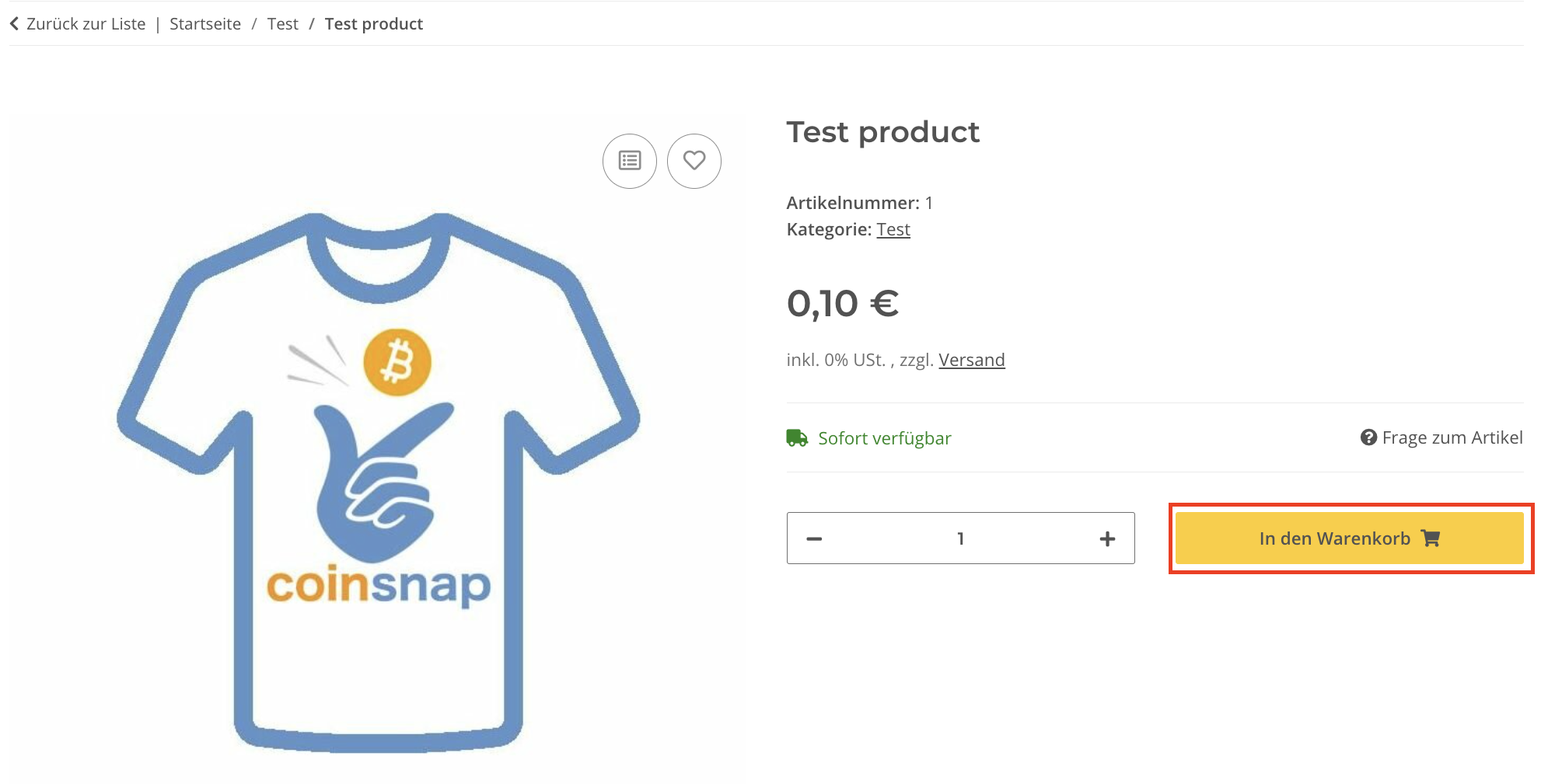
(1) Add to shopping cart

Click on the “Add to cart” button to start the payment test.
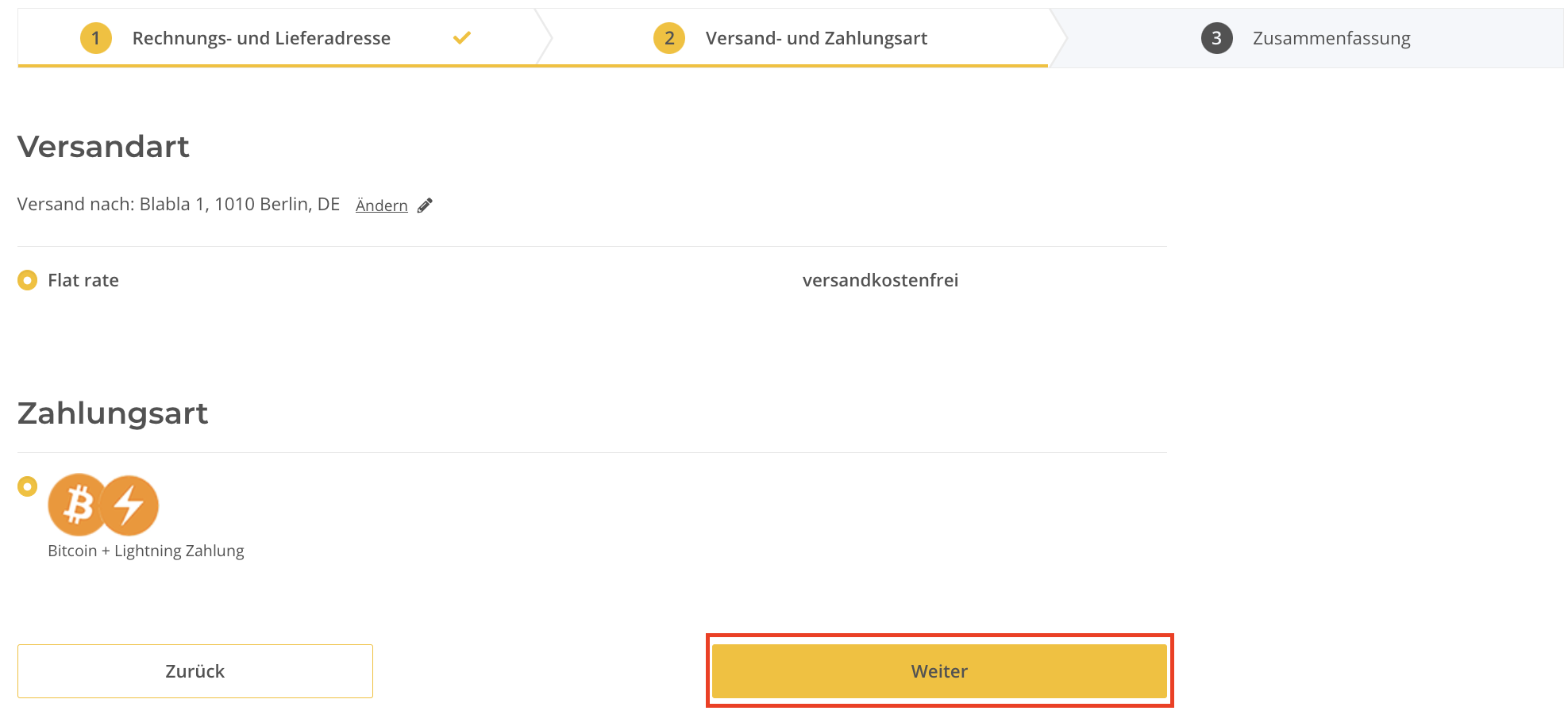
After you have filled out the form with your access data, you will see the overview of your order and the confirmation, which shows you the “Pay with Bitcoin+Lightning” button. Click on it to continue!

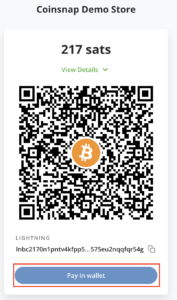
At the end you will receive a QR code that you should scan with your wallet to pay with Coinsnap Bitcoin and Lighhtning!
Test it yourself now!

Set up Coinsnap on JTL-Store

As soon as you are registered with Coinsnap, you can log in to your JTL-Store store and access the JTL-Store backend.

If you haven’t yet set up your Coinsnap account, you can create one using this link. Before you start with the JTL Store backend area, make sure you have downloaded our plugin for the JTL Store from our GitHub page. When you access the JTL store backend, go to:

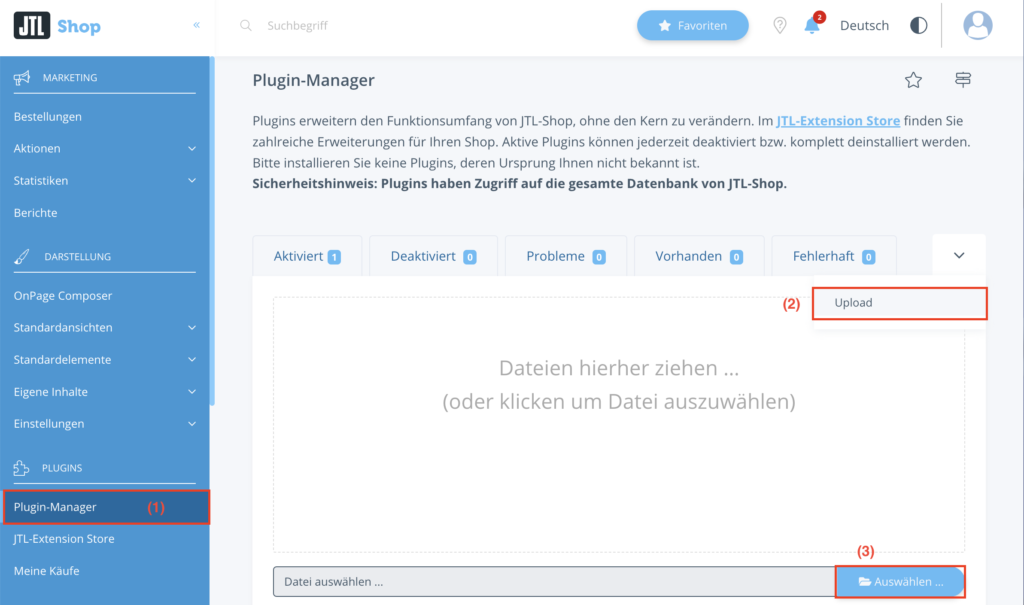
(1) Plugin Manager

Navigate to the plugin manager in the left area of the navigation menu.

(2) Upload-tab

Select the upload tab, which will be the last one on the right side. After you have selected “Upload-tab”, (3) drag the .zip file that you downloaded from our github page Coinsnap for JTL-Store Plugin onto the page.
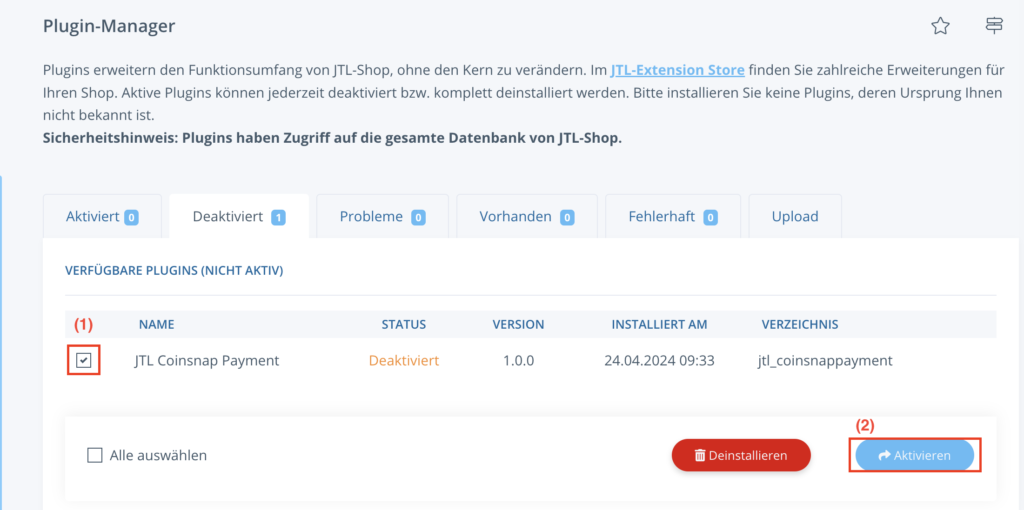
(1) “Deactivated” section

After you have installed our plugin, it will be deactivated by default. Go to the “Deactivated” section and select JTL Coinsnap Payment.

(2) “Activate” button

Click on the “Activate” button.

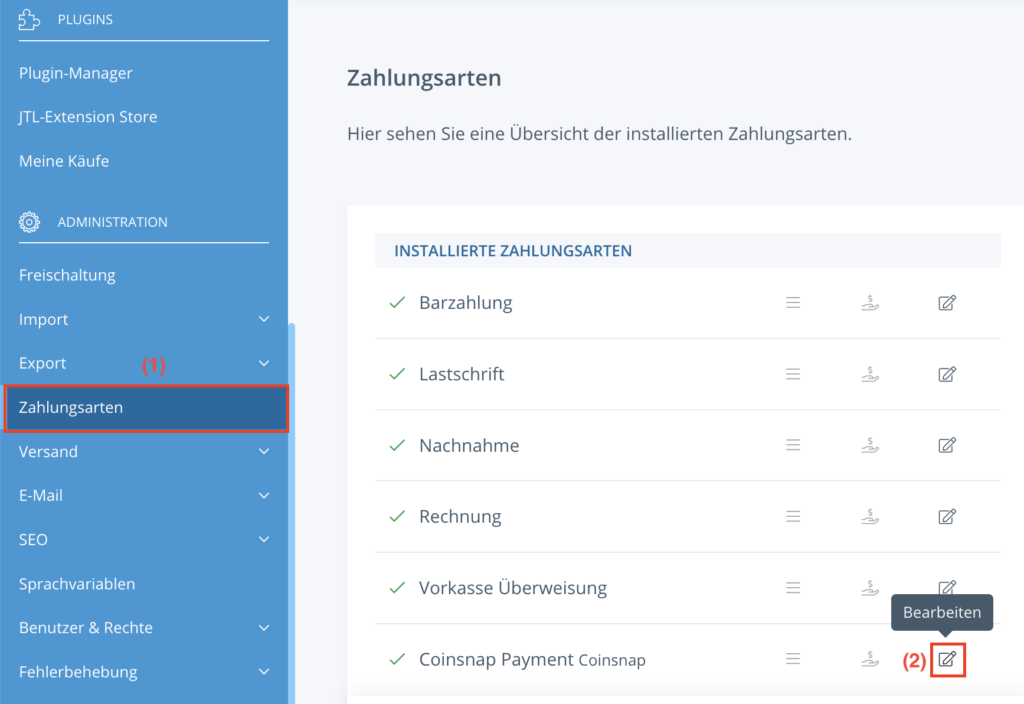
(1) Payment methods area

After successfully activating the plugin, navigate to the payment methods.

(2) “Edit” button

Select “Coinsnap Payment” and click on the “Edit” button – the small pencil that is the last in the row.
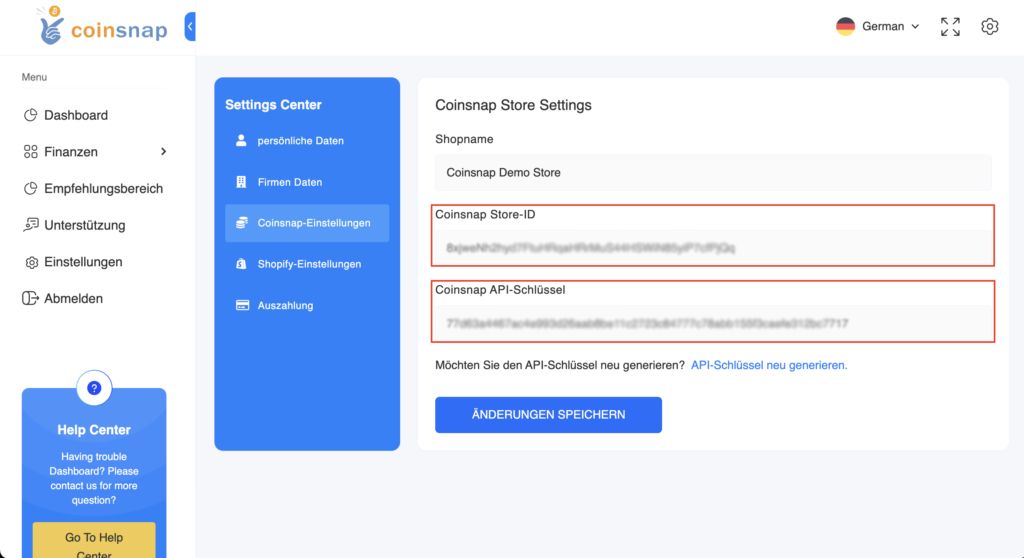
Before proceeding with further configuration, you need to copy your Store ID and API key from the Coinsnap Backend app, which you can find under the Settings section in the app.

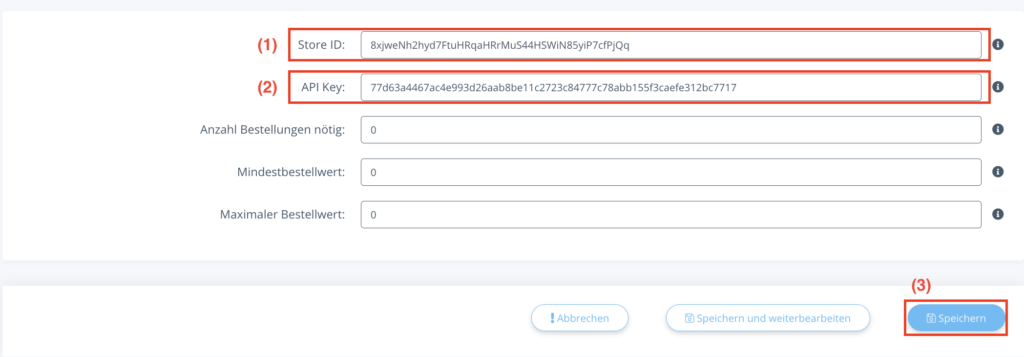
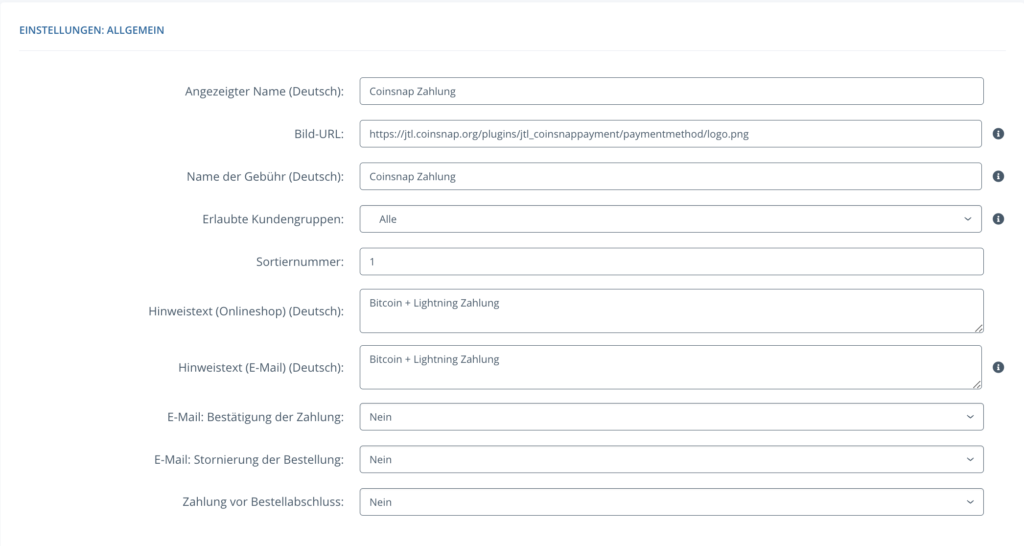
(1) General settings

First, you can make the general settings that you will have in your Coinsnap payment method.

(2) Store-ID and Api-Key

Enter the store ID and api key that you copied earlier in the correct fields.

(3) “Save” button

After you have filled in the fields, click on the “Save” button to activate this payment method.
Share

You also might be interested in

How do I get a Lightning Wallet with a Lightning address?

How do I get a Lightning Wallet?

Jun 3, 2024

How do I get a Lightning Wallet with a Lightning[...]

Coinsnap for WooCommerce Payment Plugin

Coinsnap for WooCommerce plugin

Nov 22, 2023

If you use an online shop with WooCommerce, integrating Bitcoin[...]

Coinsnap Web Point of Sale Bitcoin-Lightning Payment Solution

Web-PoS Bitcoin-Lightning Payment

Sep 5, 2024

Coinsnap Web-PoS Bitcoin-Lightning Payment The simple Bitcoin Lightning payment method[...]

Coinsnap – Lightning Payment Provider

Coinsnap is a Lightning Payment Provider and offers Bitcoin and Lightning payment processing for retail stores and online stores.

As a merchant, you only need a Lightning wallet with a Lightning address to receive Bitcoin and Lightning payments from your customers.

Helpful Links

  • Support
  • API Documentation
  • FAQ
  • Payment Plugin

Payment Modules

  • All Payment Plugins
  • WooCommerce
  • Shopify
  • Shopware
  • Gambio
  • Prestashop
  • Magento
  • Opencart
  • BTCPayWall
  • Easy Digital Downloads
  • Paid Memberships Pro
  • Wix
  • GiveWP
  • GetPaid
  • WPForms
  • Gravity Forms
  • Contact Form 7

Company

  • About Coinsnap
  • Media & Press
  • Implentation service
  • Terms and Conditions
  • Privacy Policy
  • Contact

© 2025 · Coinsnap - Snap your Bitcoin

Prev Next
Coinsnap AI Help Chat
x